
Have you ever questioned why certain information is shown in a certain way on websites and mobile applications? Why are some call-to-action (CTA) buttons designed in a way that makes you want to click on them? Why use popups to increase interaction on specific websites?
There are several ways UI/UX designers may boost the interactivity of websites and mobile applications. This information design, which appears to be overpowering, must be supported by some mechanism. In this situation, heatmaps are useful.
Using UX heatmaps, you may learn how visitors engage with a website. The heatmaps show users not just where they click on a particular page but also how far down they scroll and how long they stay on the site.
It is a great way to evaluate a website's effectiveness and determine whether the goals of the material are being achieved.
A website's heatmap provides insightful data on the components that are effective and those that want improvement.
You could want to reconsider how you're presenting this button if, for instance, you want users to click on the "Subscribe" button but you're not seeing any engagement.
Joe Troyer, CEO & Head of Growth at Digital Triggers and ReviewGrower elaborates “Making the words stand out or utilizing pleasing colors and patterns can accomplish this.
When building a new website or making improvements to an existing one, any UX web design agency makes sure to take the results of UX heatmaps into account.”
Although the process could appear complicated and intimidating, UI/UX designers are fortunate to have access to some fantastic tools.
Design experts may study visitor interactions, glean insightful information, and develop successful future strategies with the use of good UX heatmap tools.
You'll find seven of the top heatmap tools in this article that might be quite useful for your upcoming projects. Discover what heat map design tools can accomplish for you, your websites, and your company by continuing to read.
UX design using heatmaps
For UI/UX experts, a heatmap is a fantastic resource. Heatmap information provides a clear picture of the material and how it is presented online. Many heatmaps can even be used without UI/UX experts, by providin management and marketing key insights into conversion tracking, as used in many sites, such as Pro Business Plans, a service agency.
The user input you get will determine whether or not your digital design is successful. One of the best techniques for obtaining user input is a heatmap. The information acquired as a result can assist to enhance both the desktop and mobile user experiences on websites.
The fact that heatmaps offer intuitive insights is one of its strongest features for UX design. The users connecting with your website do so outside of a controlled or monitored experiment, in a real-world environment. This gives the data more legitimacy and is very useful for developing smart tactics.
The importance of heatmaps in UX
It is impossible to exaggerate the value of heatmaps in user experience. Heatmaps are used by businesses to enhance their marketing and advertising efforts, which raises conversion rates.
In addition, heatmaps involve consumers in the design process, which is consistent with design thinking ideas.
This then enables designers to recognize users' pain points and effectively address their demands. The following are some areas where the importance of a heatmap in UI design is most apparent.
- CTA
- Transparency and navigation
- Clicks
- Pages
CTA
Counting the clicks on your CTA buttons is one of the finest ways to gauge the effectiveness of your online content and the conversion rate. A heatmap will easily be able to tell you this.
Kristian Longden, Content Marketing Executive at James and James Fulfilment says “You can quickly determine which CTAs are generating the most engagement and which ones are not by simply glancing at a heatmap of an online product.”
www.freepik.com
Transparency and navigation
A website's primary menu and footer are two of its most crucial components. The user experience can be significantly impacted by the way your material is arranged in the menu.
The words you use in the menu have an impact on the navigation as well, so choose the language that customers are acquainted with and that they would expect to see on the website.
Jaden Oh, Marketing Director at TRAFFV says “You can determine the functionality of your menu using a UX heatmap. It can also let you know which navigational items are effective and can therefore be better highlighted.”
Clicks
Sometimes, website viewers may assume a certain piece will be clickable. A sentence, for instance, can be perceived as a hyperlink if its color is different, enticing viewers to click on it.
The users may become angry if these clicks have no effect. Heatmaps can find these troublesome areas on a website and assist you in fixing them.
Page
The user experience of a webpage is significantly impacted by its length. If a page is too long, users may become overwhelmed and fatigued and quickly leave the website.
A heatmap can show you where your audience is truly losing interest and how far down the page visitors are scrolling. By presenting the information on your website in a clear and appealing manner, you may use this expertise to raise its quality.
Heatmaps are commonly used for social optimization too, nowadays. Click and scroll heatmap can give you excellent data about your followers or visitors and you can optimize your content, ads or the whole image of your Facebook or Instagram account.
Heatmap tools for UX
While some of these programs are free to use with restricted capability, others may be very expensive.
Before choosing a specific tool or piece of software, it's crucial to take into account the resources and budget you have available for heatmaps. Discover the key characteristics of the top 5 heatmap tools by reading on.
- Hotjar
- Capturly
- Smartlook
- Crazy Egg
- Mouseflow
Hotjar
One of the most often used heatmap tools is Hotjar. This heatmap software's success and popularity can be attributed in part to how simple it is to use. Hotjar is really simple to use.
You get all the functionality a heatmap tool should have. You can view recorded sessions of visitors interacting with a website using Hotjar. These recordings can be quickly seen, which means they don't take up much time.
The ability to receive live feedback is one of Hotjar's distinctive qualities. On your website, you can use a Hotjar widget to get customer feedback.
Kelley Van Boxmeer, CEO of Motion Invest, a platform for buying and selling websites easily, says “Visitors can easily record their feedback by clicking on the widget, letting you know which exact website function is posing problems. This kind of informal UX research gets you good feedback with little work while avoiding in-depth study.”
Hotjar is a bit more expensive than other heatmap programs like Crazy Egg or Mouseflow. However, using Hotjar is a pleasure in and of itself. Investing in Hotjar is undoubtedly a wise move if you're seeking high-quality analysis and don't have any severe financial restrictions.
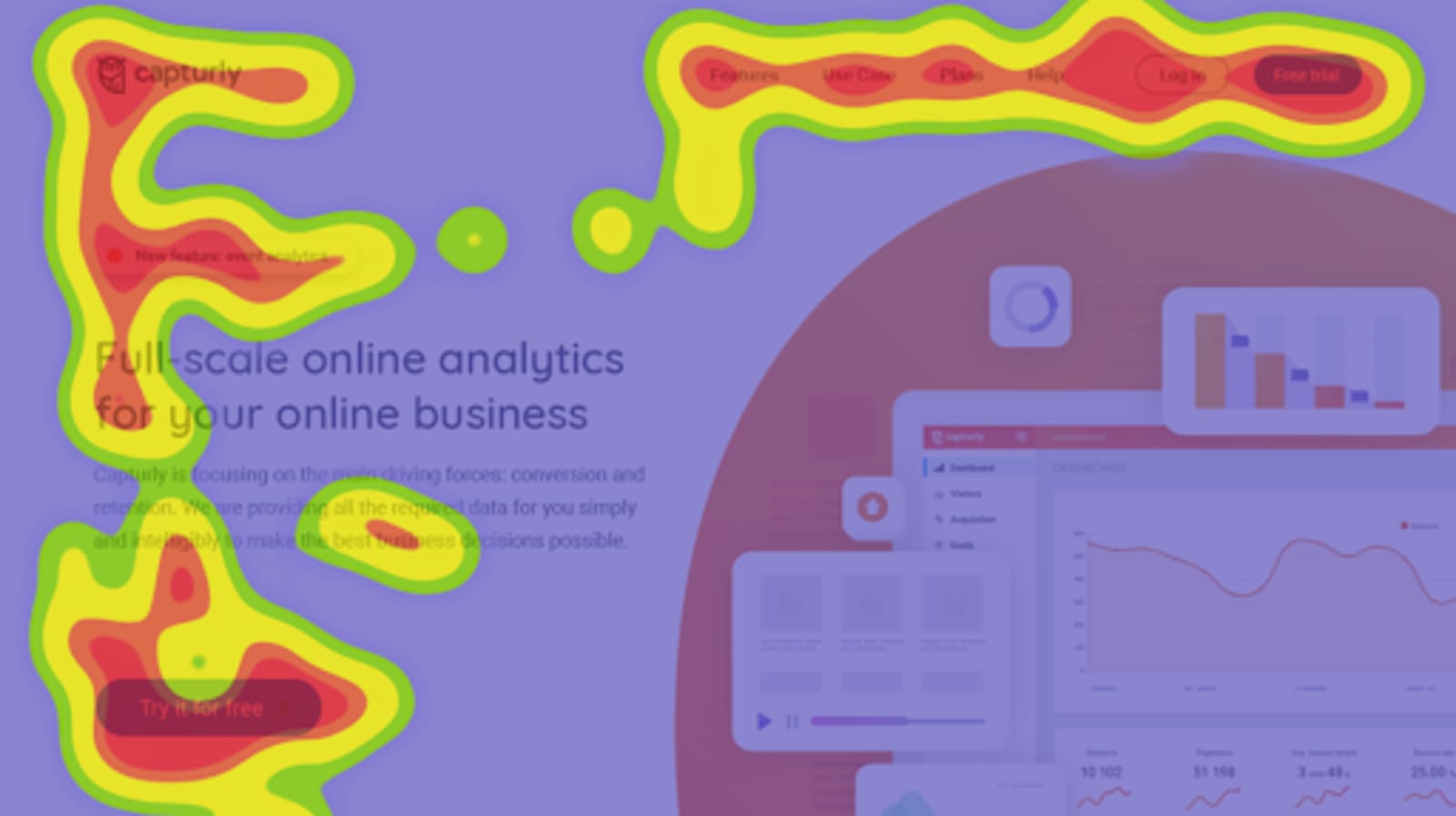
Capturly
Capturly is a thorough web analytics software that offers first-hand feedback and practical business insights to online businesses quickly and concisely. Knowledge of programming, data science, business, and engineering is the basis of Capturly.
Features:
- Heatmap tools with clicks, scrolls, and segments
- Tool for session replay
- A comprehensive website performance monitor
- Tool for optimizing conversion funnels that is simple to use
- Analysis of events
Capturly is the perfect solution if you want to gauge how well each CTA and component of your website is performing or if you simply want to see how your users behave.
www.capturly.com
Smartlook
One of the greatest heatmap tools is Mouseflow. It is not only simple to use, but it also provides high-quality data on user involvement and behavior.
The fact that Mouseflow combines six different heatmap tools is one of its best features. Click, scroll, attention, movement, geo, and live is a few of these.
Therefore, by using Mouseflow, you can gain demographic data and a real-time view of how users interact with your site content in addition to seeing where users click and how far down they scroll.
Crazy egg
Crazy Egg is the ideal option if you want to advance your heatmap game by really coming up with and putting into practice solutions. This UX heatmap tool contains all the fundamental capabilities a designer would require, including the capacity to track clicks and pinpoint the webpage sections that are receiving the highest rate of engagement.
The A/B testing function is one of Crazy Egg's greatest features. A/B testing is routinely carried out by UI/UX designers, particularly for online material.
With Crazy Egg, your job as a designer is reduced because the tool offers you a high-quality comparison of two variants of a given webpage.
This can assist you in determining which alternative is effective as well as how to improve engagement and boost conversion rates.
Mouseflow
One of the greatest heatmap tools is Mouseflow. It is not only simple to use, but it also provides high-quality data on user involvement and behavior.
The fact that Mouseflow combines six different heatmap tools is one of its best features. Click, scroll, attention, movement, geo, and live is a few of these.
Therefore, by using Mouseflow, you can gain demographic data and a real-time view of how users interact with your site content in addition to seeing where users click and how far down they scroll.
Conclusion
Heatmaps are a great tool for enhancing your company's web presence. Heatmaps might be useful whether developing a single-page website, a professional portfolio, or a challenging e-commerce website.
The development and analysis of a heatmap need little time and typically little money. But the advantages are enormous.
Your experiences as a UI/UX designer can be greatly enhanced by the tools provided in this article. No matter where you are in your career as a designer, understanding the value of heatmaps will help you a lot.
Professional UI/UX designers are fully aware of the usefulness of heatmaps and constantly consider how users interact with websites, especially those working on online information design.
Making use of heatmaps will help your initiatives be valuable and your websites are useful.
We hope we can help.
is a Founder & CEO of Jeenam Infotech who has a passion for helping customers as a Link Building Consultant. You can connect with him on Linkedin.











