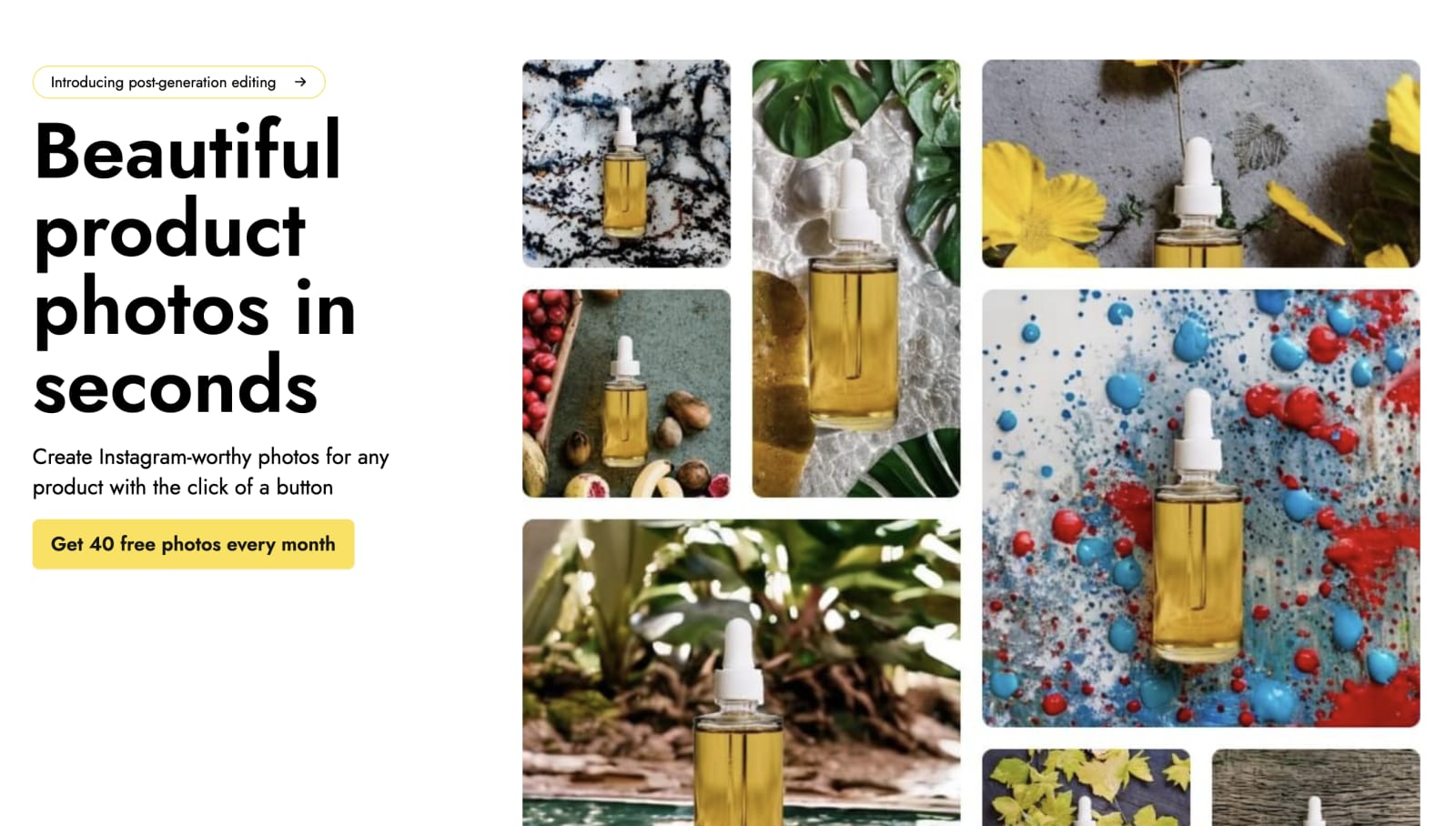
Creating professional-looking photography without any fancy equipment or setup. With Pebblely and its custom feature that uses AI to generate high-quality backgrounds for images. It is said that with Pebblely you can create product images that meet your requirements in minutes.
A client who required some product photographs for social media, their websites, and advertising across different media was the perfect chance to test Pebblely out and see whether we could achieve satisfactory results without the elaborate and traditional photo shoot setup.
The client provided a comprehensive brief, outlining the requirements for the project. In essence, the objective was to create photographs that convey a luxurious and natural brand image for XYZ Cosmetics' new skincare line for use on social media platforms. The mood of the photoshoot must be fresh, clean, and modern, with a touch of luxury. A shot list was provided which included individual shots of each product, lifestyle shots featuring models using the products in a bathroom or vanity setting, close-up shots emphasizing key ingredients or product application, flat lay shots of the entire product line, and detail shots highlighting specific product features, such as pump or applicator. As per brand guidelines, the color palette to be followed was light and neutral with accents of pastel tones.
Provided with this brief, I embarked on utilizing the capabilities of Pebblely to harness its potential in streamlining the design process for this new project.
Putting it to the test:
Product Images
I sourced PNG images of products to be fed into Pebblely to generate images.

Custom Prompt
With the custom option, I filled in the template using a prompt inspired by the brief. Within the template, there is a "match a style" option that allows you to select a reference style for the generated images. This flexible feature provides the choice of predefined options or the ability to upload your own image, narrowing down the AI's generation possibilities.
Generate
With each generation, you are presented with four image options to choose from.
Editing
The software offers limited editing options, primarily allowing for "erase" and "restore" functionalities. This limitation can make it challenging to fine-tune the generated images according to specific requirements or desired adjustments.
Drawbacks that I found:
One drawback I observed is that the AI tends to generate backgrounds that result in a flat look, lacking overlapping elements or applied effects on top of the inserted image (product). Another limitation is the inability to edit previous prompts once they are attached to each generated image. This means that there is no way to go back and modify the prompts to further refine or build upon the previously created images.
The inserted image remains static in terms of its position and size, regardless of the dynamically generated background.
Useful features:
Pebblely offers a helpful guide on effectively utilizing the AI to generate custom images and achieve optimum results.
While the images generated by the AI may require additional editing to add depth and enhance realism, they serve as a solid foundation for designers to build upon. Designers can manually edit these images to achieve their desired level of quality and ensure the final result aligns with their creative vision.
Pebblely-generated image
Manually-edited image
Pebblely excels in generating images with theme-appropriate backgrounds, showcasing its ability to comprehend written prompts effectively. This feature proves especially valuable as it saves time that would otherwise be spent browsing for background images to create mockups. It becomes particularly useful in situations where a proper photography setup with lighting, props, and backgrounds for product shots is unavailable.
Another potential use for this AI tool is allowing clients to generate images for briefs, which photographers or designers can then use as references or to create mood boards. This streamlines the creative process and facilitates collaboration between clients and creative professionals.
However, it's important to note that Pebblely has limitations. It is unable to generate overlapping elements or apply effects on top of inserted images, which may limit creative possibilities. Additionally, the inability to edit previous prompts or modify previously generated images can be restrictive in certain scenarios. Despite these limitations, Pebblely AI offers a convenient solution for quickly generating static backgrounds that enhance the visual appeal of images, providing a valuable resource for designers and creators.

Bhavya Shah is a graphic designer focused on brand strategy and fascinated by UX research. She thrives on combining research, data, and design to create impactful visual solutions.











